Every studio runs at its own pace. A solo freelance animator managing ten assets has completely different needs from a thirty-person team juggling modeling, rigging, and rendering in parallel. Yet most animation production management software imposes a rigid structure — and that’s where teams end up working for the tool, rather than the other way around.
Cotoon is built around a different philosophy: your animation pipeline should stay yours. By combining production scheduling, advanced filters, dynamic grouping, and saved views, you can shape a workspace that adapts precisely to your studio’s reality — whether you’re a team of one or a hundred.
Schedule with Intent: The Integrated Production Calendar
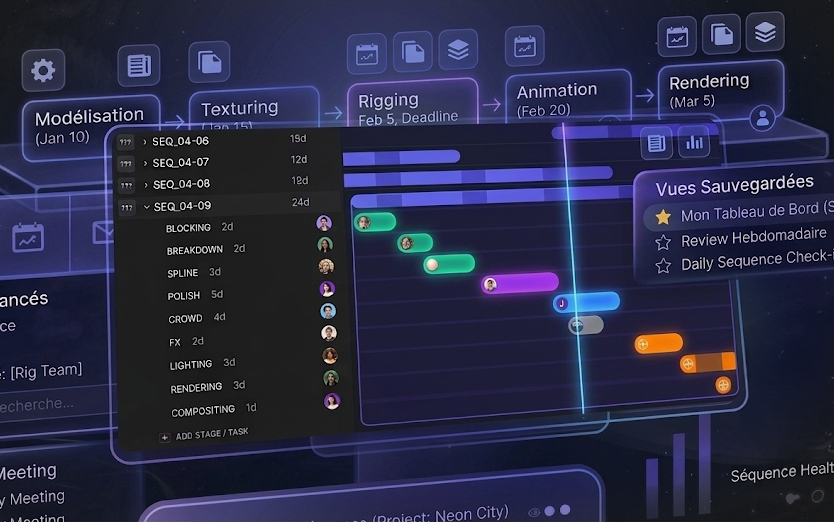
A solid animation production pipeline starts with a clear picture of time. Cotoon integrates a production calendar directly into your workspace, letting you visualize all your pipeline stages — modeling, texturing, rigging, animation, rendering — in a coherent timeline, without ever leaving the platform.
You can assign start dates and deadlines to each pipeline stage, for each individual asset. The system automatically calculates available working days, so you avoid unpleasant surprises at the end of a sprint. If a deadline slips, you see it immediately in the calendar view and can reschedule the entire production plan in seconds.
For studios running multiple projects simultaneously, this view becomes an invaluable production management tool: spot bottlenecks early, anticipate workload peaks, or simply confirm that a client delivery date is realistic before committing to it.
Advanced Filters to Isolate Exactly What You Need
Production scheduling loses its value if you can’t quickly find the assets that matter. Cotoon offers a comprehensive filtering system that lets you query your entire asset database across multiple parameters at once: file type, uploader, assigned reviewer, current pipeline stage, status, custom classifications, and even file dependencies.
In practice, this transforms the daily workflow for every role in the studio:
- A rigging supervisor can instantly surface only the assets currently in the Rigging stage, assigned to their team, with a status of “In Review” — and filter out everything else.
- A producer can pull up every asset whose deadline falls within the current week, regardless of type or assignee, to prepare for the daily standup.
- A freelance animator can isolate only the files specifically assigned to them for review, without drowning in the rest of the project’s uploads.
This level of precision is especially powerful in 3D and VFX pipelines, where a production can contain hundreds of files of vastly different natures — geometry, textures, rigs, sequence renders — all coexisting in the same workspace.
Dynamic Grouping: Give Shape to Your Workspace
Filtering cuts the noise. Grouping gives structure to what remains. Once your filters are active, you can reorganize your workspace layout by dynamically grouping the results according to whatever logic fits your current task.
Grouping by file type is perfect during audit or delivery phases, when you need to confirm that every asset category is accounted for. Grouping by assigned reviewer instantly turns the board into a workload view, letting supervisors see at a glance whether anyone is overloaded.
Grouping by pipeline stage is arguably the most powerful option for day-to-day animation production tracking. You can organize the board by stage name for a broad workflow overview, by stage assignee for granular individual tracking, or by stage status to immediately identify what’s blocked or waiting for approval.
Switch between modes in seconds depending on the context: list view for team meetings, grid for visual review sessions, calendar for weekly production scheduling.
Saved Views: Turn a Configuration into a Permanent Tool
This is where everything comes together. Manually reconfiguring your filters, grouping, and display mode every morning is a hidden productivity cost that most teams seriously underestimate. Saved views eliminate that friction entirely.
Once you’ve dialed in the perfect setup — say, “assets in the Render stage, filtered by this week’s deadline, grouped by assignee, in list view” — you can capture it permanently as a custom view. It becomes a standing tool in your workflow, accessible with a single click.
Saved views scale to every team structure imaginable:
- Personal dashboards: Every team member can build their own private views, calibrated to their specific responsibilities. The 3D artist, the supervisor, and the producer each get a clean, focused workspace without noise or interference from the rest.
- Team alignment: Flip a view to public mode and you instantly share that exact layout and filter configuration with your entire team. It’s the fastest way to make sure everyone is looking at the same data during a daily meeting or client approval session.
- Favorites for critical views: Your most important configurations can be bookmarked and stay permanently accessible at the top of your screen — zero hunting, instant access.
A Pipeline That Looks Like Your Studio
The real promise of these combined features isn’t technical — it’s organizational. By pairing precise production scheduling with role-specific filters, grouping that mirrors your team structure, and saved views that codify your best practices, you build an animation production tracking tool that thinks like your studio.
A solo artist can set up a personal dashboard in ten minutes that’s just as powerful as one built for a fifty-person studio. A distributed remote team can share the exact same working view, regardless of time zone. A supervisor can toggle in two seconds between their team workload view and the project-wide status overview.
Your animation pipeline has a unique shape. Cotoon fits it — not the other way around.